Sunday, 1 November 2015

Hibernate native SQL queries

Hibernate provide a createSQLQuery method to let you call your native SQL statement directly.

Here we are joining 3 tables.

 Session session = sessionFactory.getCurrentSession();
 Query query = session
                         .createSQLQuery("SELECT psh.* FROM prod_sales_history psh,customer c,city cit where (psh.status=:status1 or psh.status=:status2) and cit.id=:cid and c.city=cit.id and psh.cust_id=c.id order by order_date;")
                    .setParameter("cid", cityId).setParameter("status1", Constants.ORDER_COMPLETELY_APPROVED).setParameter("status2", Constants.ORDER_PARTIALLY_APPROVED);
            List<Object[]> prodList =query.list();
for (Object[] object : prodList) {
System.out.println(object[0].toString());
             }

Fetching unique result from 3 tables placing in HashMap.

Session session = sessionFactory.getCurrentSession();
        Query query0 = session.createSQLQuery("SELECT * FROM agent where id=:agentId")
                .setParameter("agentId", Integer.parseInt(agentId));
        query0.setResultTransformer(AliasToEntityMapResultTransformer.INSTANCE);
        Query query = session.createSQLQuery("SELECT sum(pa.approved_sell_price) as amt FROM agent_order_map am,products_approved pa where  pa.status=:status and pa.id=am.products_approved_id and am.agent_id=:agentId")
                .setParameter("status", Constants.PRODUCT_AMOUNT_RECEIVED_AGENT)
                .setParameter("agentId", Integer.parseInt(agentId));
        query.setResultTransformer(AliasToEntityMapResultTransformer.INSTANCE);
        Query query1 = session.createSQLQuery("SELECT sum(amount) as amount FROM agent_payment where agent_id=:agentId")
                .setParameter("agentId", Integer.parseInt(agentId));
        query1.setResultTransformer(AliasToEntityMapResultTransformer.INSTANCE);
        Map<String, Object> listResult = new HashMap();
        listResult.put("Agent",query0.uniqueResult());
        listResult.put("TotalAmountToBePaid", query.uniqueResult());
        listResult.put("TotalPaid", query1.uniqueResult());
        return listResult;


Maintain session in Web Applications.

Provides a way to identify a user across more than one page request.
The servlet container uses this interface to create a session between an HTTP client and an HTTP server. The session persists for a specified time period, across more than one connection or page request from the user.

We can save user data in modal and modal can be set to session while login.

Example:AuthenticationResponse is a modal.

AuthenticationDAO.java

   @Autowired
    private HttpSession httpSession;
    public void setHttpSession(HttpSession httpSession) {
        this.httpSession = httpSession;
    }

AuthenticationResponse authentications = new AuthenticationResponse();
                authentications.setRole(role.getUserRole().getId());
                authentications.setUserId(id.getId());
    httpSession.setAttribute("isLogin", authentications);
          
Header is common in all pages and it is loaded first when page loads.
In Header we can check whether user session exist.

Header.html

  $.getJSON("rest/authentication/isLogin", function(res){
           if(res.status){

          // user session exit
    
}else{              
               location.href="index.jsp"}

});
 
AuthenticationDAO.java

   @RequestMapping(value="/isLogin",method=RequestMethod.GET)
    public @ResponseBody  Boolean isLoginUser(){
        try {
            AuthenticationResponse loginAuth = (AuthenticationResponse) httpSession.getAttribute("isLogin");
            if(loginAuth!=null){
                return true;
            }
        } catch (Exception e) {
            e.printStackTrace();
               return false;   
        }
  }

Friday, 10 April 2015

Export Table To Excel Using Jquery

 HTML
 <table id="tableId"> <tr> <th>Id</th> <th>Name</th> <th>Sal</th> </tr> <tr> <td>1</td> <td>Abc</td> <td>100000</td> </tr> <tr> <td>2</td> <td>Pqr</td> <td>100000</td> </tr> <tr> <td>3</td> <td>Xyz</td> <td>100000</td> </tr> </table>

<input type="button" id="btnExport"  
value=" Export Table data into Excel " /> 
 
JAVA SCRIPT   
 
 <script src="http://ajax.googleapis.com/ajax/libs/jquery/2.0.0/jquery.min.js">
</script>
<script src="../src/jquery.table2excel.js"></script>  
 
 $("#btnExport").click(function (e) {
var dt = new Date(); $("#tableId").table2excel({ exclude: ".noExl", name: 'Table'+dt.getDate()+'_'+(dt.getMonth()+1)+'_'+dt.getFullYear() }); 
});
 jquery.table2excel.js

//table2excel.js
;(function ( $, window, document, undefined ) {
  var pluginName = "table2excel",
    defaults = {
    exclude: ".noExl",
                name: "Table2Excel"
  };

  // The actual plugin constructor
  function Plugin ( element, options ) {
    this.element = element;
    // jQuery has an extend method which merges the contents of two or
    // more objects, storing the result in the first object. The first object
    // is generally empty as we don't want to alter the default options for
    // future instances of the plugin
    this.settings = $.extend( {}, defaults, options );
    this._defaults = defaults;
    this._name = pluginName;
    this.init();
  }

  Plugin.prototype = {
   init: function () {
    var e = this;
    e.template = "<html xmlns:o=\"urn:schemas-microsoft-com:office:office\" xmlns:x=\"urn:schemas-microsoft-com:office:excel\" xmlns=\"http://www.w3.org/TR/REC-html40\"><head><!--[if gte mso 9]><xml>";
    e.template += "<x:ExcelWorkbook><x:ExcelWorksheets><x:ExcelWorksheet><x:Name>{worksheet}</x:Name><x:WorksheetOptions>";
    e.template += "<x:DisplayGridlines/></x:WorksheetOptions></x:ExcelWorksheet></x:ExcelWorksheets></x:ExcelWorkbook></xml><![endif]--></head><body><table>{table}</table></body></html>";
    e.tableRows = "";

    // get contents of table except for exclude
    $(e.element).find("tr").not(this.settings.exclude).each(function (i,o) {
     e.tableRows += "<tr>" + $(o).html() + "</tr>";
    });
    this.tableToExcel(this.tableRows, this.settings.name);
   },
   tableToExcel: function (table, name) {
    var e = this;
    e.uri = "data:application/vnd.ms-excel;base64,";
    e.base64 = function (s) {
     return window.btoa(unescape(encodeURIComponent(s)));
    };
    e.format = function (s, c) {
     return s.replace(/{(\w+)}/g, function (m, p) {
      return c[p];
     });
    };
    e.ctx = {
     worksheet: name || "Worksheet",
     table: table
    };
    window.location.href = e.uri + e.base64(e.format(e.template, e.ctx));
   }
  };

  $.fn[ pluginName ] = function ( options ) {
    this.each(function() {
      if ( !$.data( this, "plugin_" + pluginName ) ) {
        $.data( this, "plugin_" + pluginName, new Plugin( this, options ) );
      }
    });

    // chain jQuery functions
    return this;
  };

})( jQuery, window, document );
 

Wednesday, 11 March 2015

MySQL GROUP_CONCAT Function

MySQL GROUP_CONCAT(): Function returns a string with concatenated non-NULL value from a group.

Let’s take a look at the table vehicle_Driver.

We can find each vehicle_number having more than one driver_id.
i.e 1 vehicle contains more than one driver.

Desired Output:

id   vehicle_number    driver_id
1      HR55M6112       2,1,10

Want driver names to be displayed in place of driver_id look at driver_master.


Desired Output

vehicle_number  driver_name

HR55M6112       Abc,Xyz,Pqr

Query

SELECT m.vehicle_number,
(select GROUP_CONCAT(driver_name) from driver_master where driver_id in (select driver_id from vehicle_driver where vehicle_number=m.vehicle_number)) drivers
             FROM vehicle_driver m group by vehicle_number;


Wednesday, 6 August 2014

How to take backup and restore database through commandprompt

It is a good idea to backup your MySQL data occasionally as a precautionary measure. It is also a good idea to create a backup before making any major changes, in-case something goes wrong and you need to revert to the unmodified version. Database backups can also be used to transfer your database from one server to another if you change web hosts.

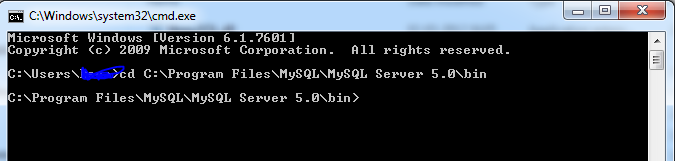
Open command prompt.


First go to MySQL bin folder.

Take Backup.
mysqldump -u username -ppassword databasename>databasename.sql

Eg:
mysqldump -u root -ppassword Test>c:\Test.sql

If it displays Access is denied.

Run cmd as Administrator

Start->cmd->Right click Run as Administrator.

                                                                     Restore.
mysql -u username -ppassword databasename<databasename.sql

Eg:
mysql -u root -ppassword Test<"c:\Test.sql"


Tuesday, 5 August 2014

Selecting duplicate IDs in mysql

select column_name,count(*) from table_name group by column_name having count(*)>1;

Example:

select consignment_id,count(*) from trip_sheet_trip group by consignment_id having count(*)>1;

Tuesday, 29 July 2014

Hibernate Named Query with Aggregate function

Code for executing Native SQL Query.

Session session = sessionFactory.getCurrentSession();
 
Query query = session.createSQLQuery(
"SELECT sum(hsd_plt_veh) as hsd_plt_veh,sum(randmCost) as randmCost"+
 "from expenses_profit where monthk=:mon and yeark=:yr");
 .setParameter("mon", 1) 
.setParameter("yr", 2014);
 
Object obj=return query.uniqueResult(); 

When we use Native SQL it returns an object.

************************************************************************************************

If we need column names along with the Object use below code.

Session session = sessionFactory.getCurrentSession();
 
Query query = session.createSQLQuery(
"SELECT sum(hsd_plt_veh) as hsd_plt_veh,sum(randmCost) as randmCost"+
 "from expenses_profit where monthk=:mon and yeark=:yr");
.setParameter("mon", 1) 
.setParameter("yr", 2014); 
Map<String, String> expensesProfits =(Map<String, String>) query.uniqueResult();
query.setResultTransformer(AliasToEntityMapResultTransformer.INSTANCE); 
 
//contains column names and values
List<Map<String,Object>> aliasToValueMapList=query.list(); 
********************************************************************************** 
If we use 
 .addEntity(Cost.class) ;
All checks for all columns in the table in query.
Suppose id is 1st column if we dont mention in query 
It gives following error.
 
ERROR org.hibernate.util.JDBCExceptionReporter - Column 'id' not found.